
Make every location, without exception, the no. 1 in its area
One dashboard to run all your listings, compare performance across locations and apply changes to your whole group in one click.
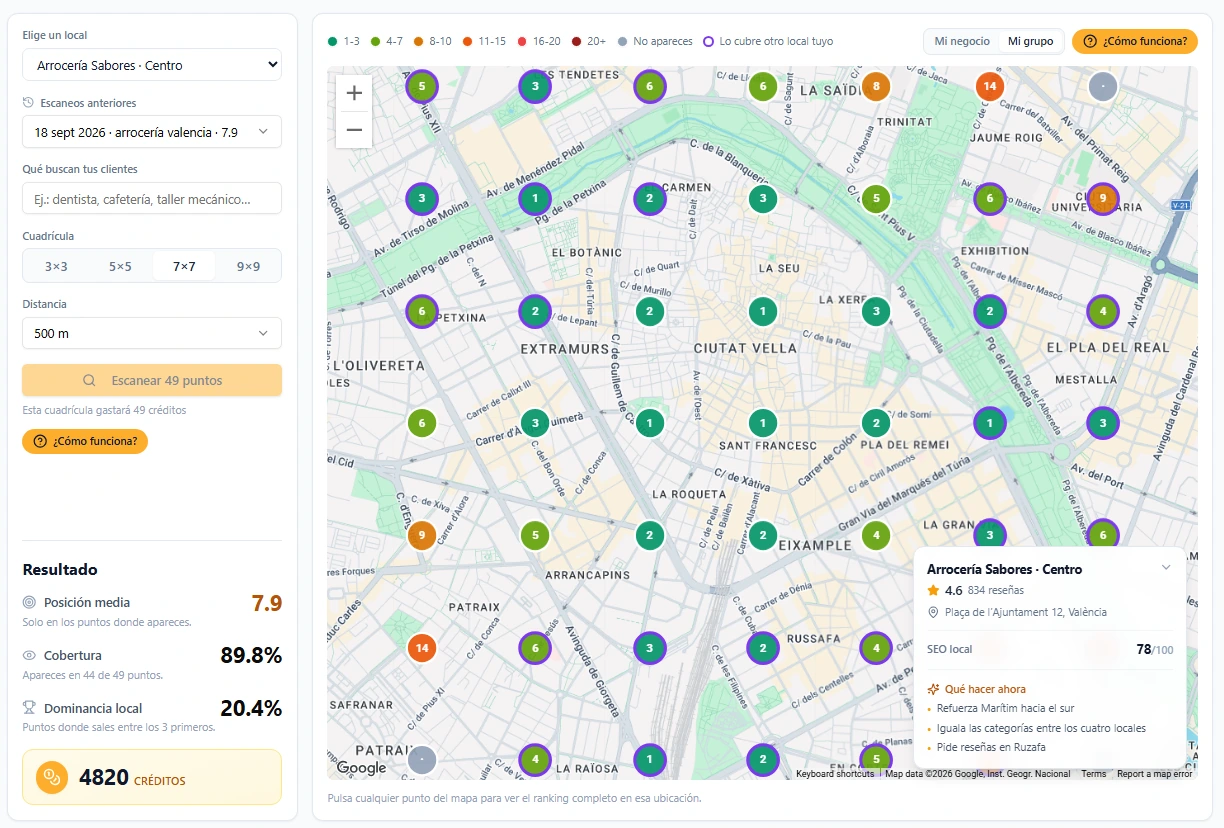
The position scanner, exactly as you see it inside the dashboard
Ten locations, ten open tabs, and no overall picture
Each location has its own listing, its own reviews, its own position on Google Maps. Without a dashboard that brings them together, running them means going in one by one, repeating the same task multiplied by every site, and trusting that nobody forgets one.
And what you really lose is not just time. It is the overall picture: while you are busy with the location making the most noise, another one can spend weeks slipping down the rankings without anyone noticing, because nobody has a way to compare them all at once.
With two locations you can still hold it together by hand. With five it gets hard, and past ten, running them stops being a task and becomes a job in itself: someone on your team spending hours repeating the same thing with twenty different passwords, with nobody able to say, with data, which site is doing well and which is not.
Hundreds of hours
that your team stops losing every year on tasks repeated location by location
All your locations, one single screen
Every Google listing you manage lives in the same dashboard, with no signing in and out of one account after another. You pick the location from a selector and everything below is that site’s: its reviews, its position, its score.
And the reviews from all your locations arrive in one inbox, so replying is not hopping from listing to listing — it is a single list you work through to the end.
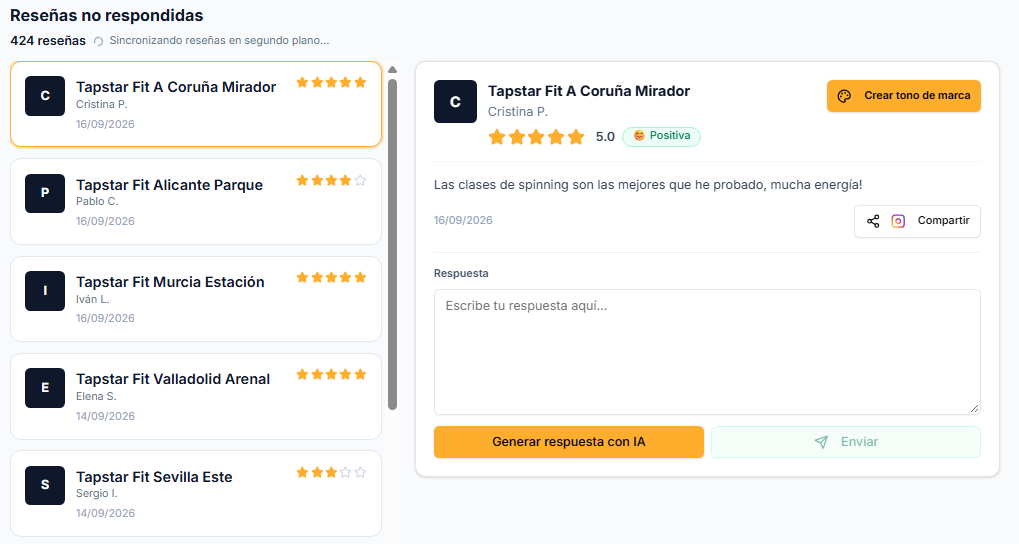
- One single loginNo handing out Google passwords to site managers.
- Unified inboxEvery review arrives with its location’s name beside it, so you know where it came from without switching screens.
- Permissions per siteEach manager sees their own, and you see everything.
One session a day instead of one per location.
You know exactly which one needs help today
You see each location’s average position, side by side, without going in to look at them separately. While one is doing well another may be slipping, and this is where you notice before it is too late.
You know which one to start with, instead of guessing or going through them one at a time to see whether something is wrong. And because the history is kept, you do not just see today’s snapshot: you see who is climbing and who is falling month by month.
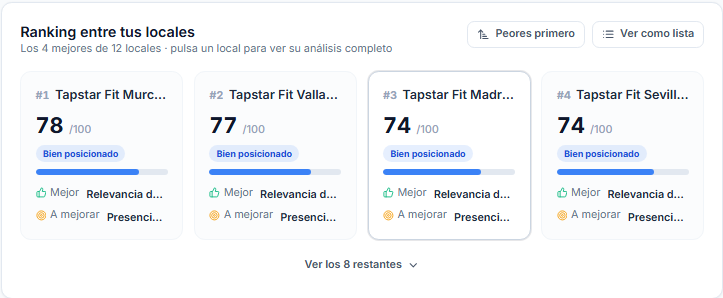
- Average position per siteEach location’s average ranking, counting only the points where it appears.
- Coverage and dominanceHow many points each one shows up at, and at how many it is in the top three.
- Month-by-month historyThe trend for each site, to tell a bad day apart from a real decline.
Stop going through ten listings to find the one that is failing.
Every location, with its own scanner and its own score
Each site scans its own area separately, with the search its customers actually use and the grid size that makes sense for its neighbourhood. What you see for each one is its own: nothing gets mixed or diluted between sites.
And every location also has its own SEO score from 0 to 100, with its level and its next recommended action, exactly as if you ran a single location.
- Its own score and levelFrom “Just starting” to “Local leader”, worked out from that listing’s real data.
- Six areas measuredReputation, activity, photos, categories, keywords and the listing’s details.
- Next action per siteWhat lifts that particular location most, not generic advice for the whole group.
Each site’s diagnosis, done and ranked by impact.
You see how your brand covers an area, not just how one location is doing
As well as each site’s map, in every scan you can see your BRAND’s coverage in that area: at each point it takes the best ranking between the location you scanned and any other location of yours that shows up there. That way you see whether a corner is covered by your other site instead of writing it off.
It is the difference between knowing that “the High Street location is doing well” and knowing which parts of that area you have covered with everything you have open around it.
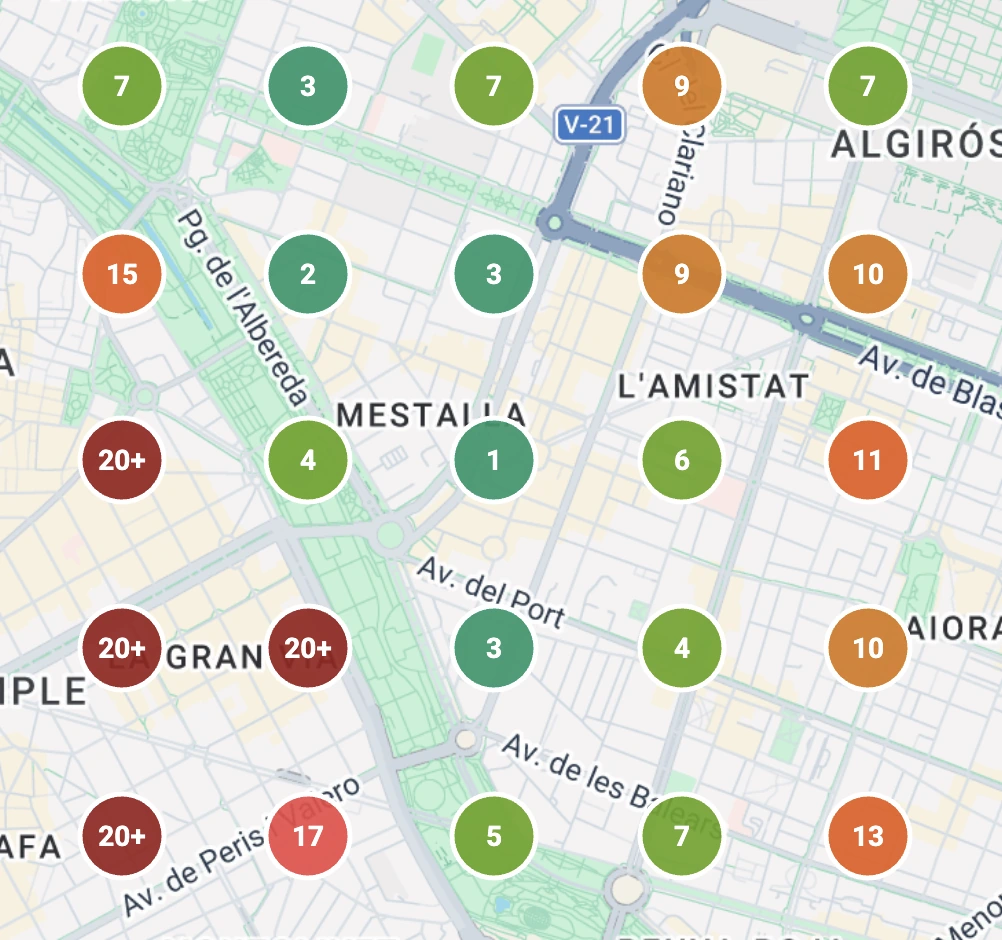
- Brand dominanceAt what percentage of the points in that area your group is in the top three, not just the location you scanned.
- Coverage gapsThe points none of your locations reach, which is where it makes sense to grow.
- Without losing the detailYou still have the point-by-point map of each site whenever you want to go into the specifics.
A coverage figure you can take to management without working it out yourself.
The count is conservative: the ranking of your other locations is read from the top 20 kept for each point, so one that falls below that counts as not showing. It never inflates the figure.
Set it up once, and it works across all your locations
You choose whether each location replies in its own tone or whether they all speak with the brand’s. You set the rule up once and it applies at every site, without repeating the work location by location. And you decide which ratings get answered automatically and after how long: out of the box, 4 and 5 stars are automated and the low ones stay as an alert, which is the sensible setting, but you can automate right down to 1 star if you prefer.
The words that matter to you are watched across the whole group at once: as soon as they show up in a new review at any of your locations, the email reaches you straight away. And with low-rating alerts, you hear about the bad review within minutes, whichever location it came from.
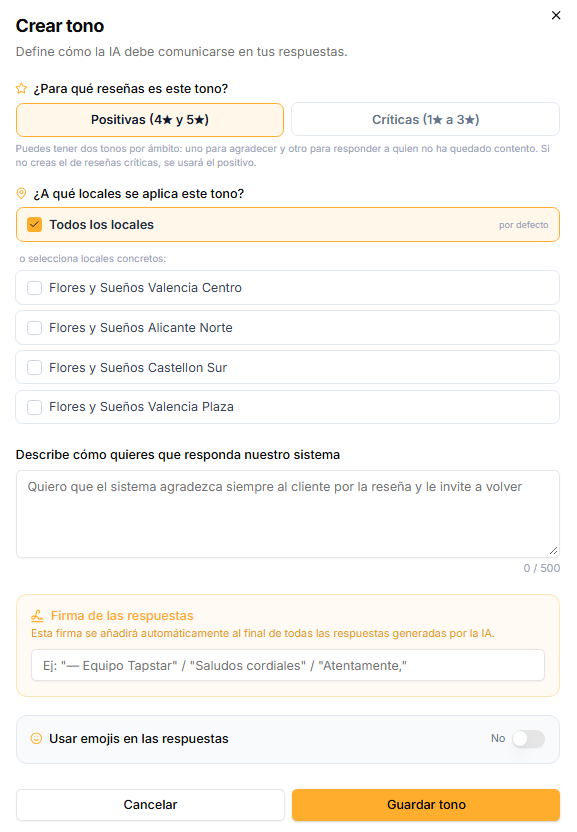
- Its own tone, or the brand’sEach site with its own voice, or a single voice across all of them if you prefer consistency.
- Shared keywordsOne general rule watching the reviews at all your locations, and whatever exceptions you want per site.
- Immediate alertsYou react fast wherever the problem is, without checking each location separately.
One setup for the whole group, not one per site.
One change, the whole group updated
If a bank holiday lands or you change the seasonal opening hours, there is no need to go in location by location. You pick the sites, change it once and it applies to them all: opening hours, categories, phone numbers, website, social profiles and amenities. Photos too, uploading one batch to several locations at once.
And posts are written once using variables such as the location’s name, the city or the address: they come out adapted at each site without repeating the work. No writing the same offer twenty times with twenty different addresses.
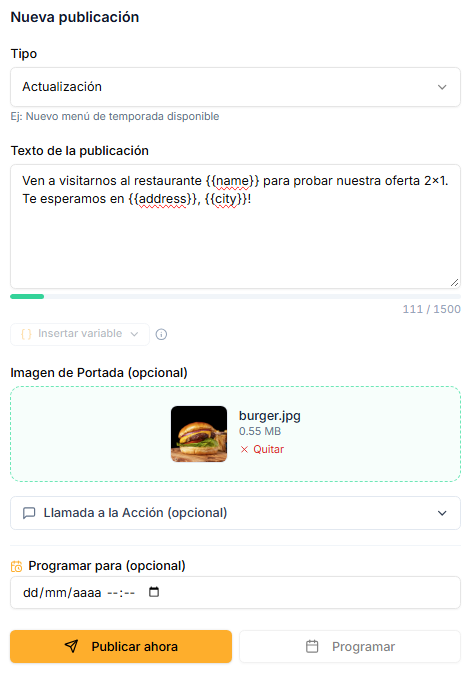
- Bulk opening hoursBank holidays and seasons applied in one go to the sites you choose.
- Variables per siteEach location’s name, city, address, phone and website fill themselves in.
- Scheduled in advanceThe whole month set up in one sitting, up to 180 days ahead.
Twenty posts in the time it takes to write one.
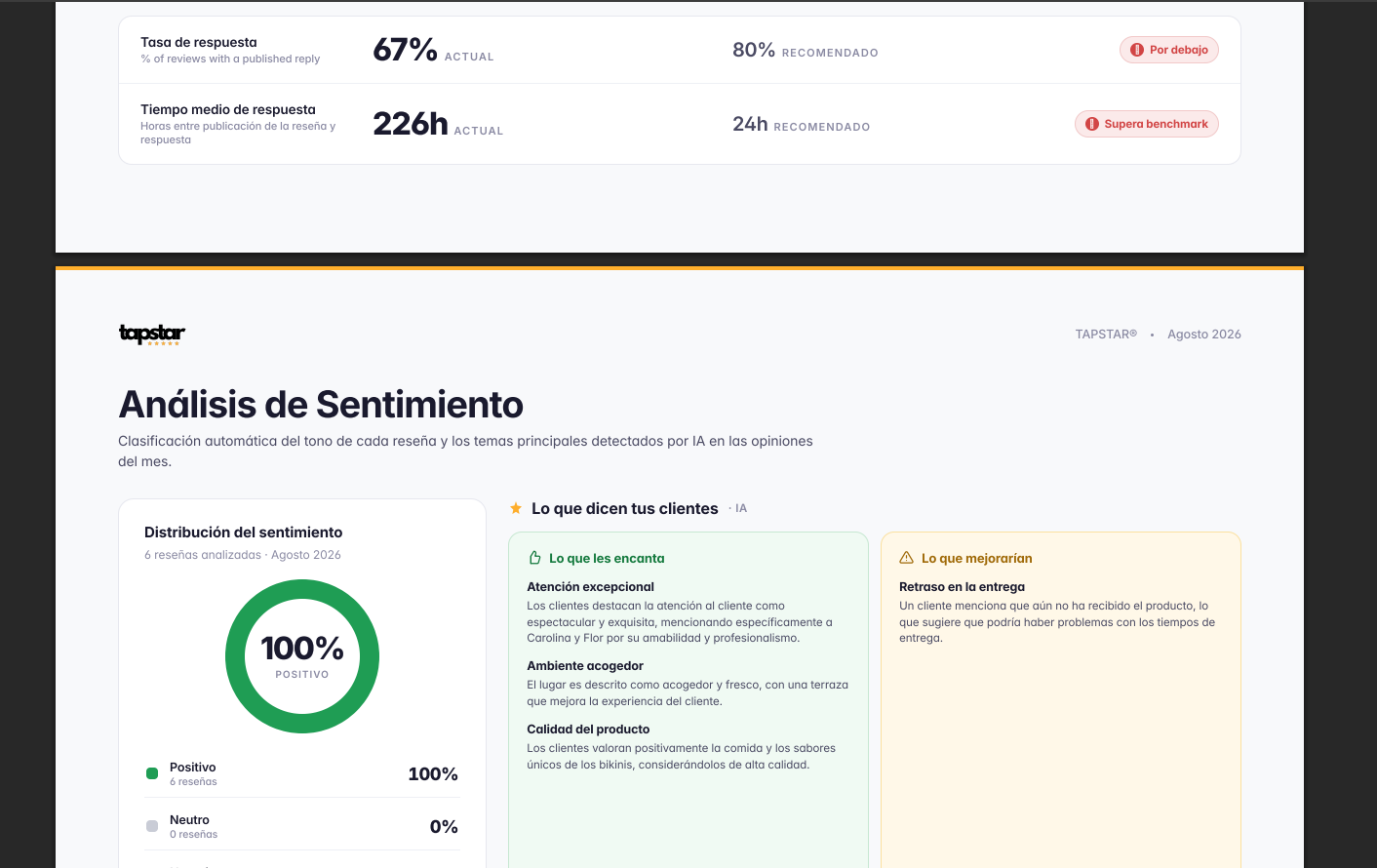
A group-wide report, and the detail of each site if you need it
On the 1st of every month you get a PDF with the performance of your whole group: reviews, sentiment, your customers’ keywords and your visibility metrics, adding up all your locations. And if you need to go into the detail of one particular site, you have its individual report with the same depth, without having to add it up yourself location by location.
It is the document you can take into a management meeting without preparing anything: what happened across the whole group last month, and which site to focus on next month.









Frequently asked questions
Usually not from scratch: if you already have all your listings in the same Google Business account, you connect them together when you link that account. You would only need to connect them one by one if they are spread across different Google accounts.
No. Each location keeps its own reviews, its own score and its own scanner. The only thing aggregated is what you choose to look at: brand coverage within a scan, or the monthly report for the whole group.
Yes, each location can have its own tone, or you can apply the same one to all of them if you prefer a single brand voice.
Yes. You pick the sites, make the change once and it applies to them all: opening hours, categories, phone numbers, website, social profiles, amenities and photos. What is still done listing by listing is each one’s own details — the description, the address — and the action links. The business name cannot be changed from here under any circumstances: Google puts it through review and it has to be edited in their dashboard.
If you have fewer than 5 locations, you are better off starting straight from the main landing page with the 7-day free trial.
Request more information, no strings attached
Tell us about your group and we will explain how it fits your locations. We get in touch within 24 hours.