
Own your area on Google Maps
Attract more customers by coming up higher, not just on your own doorstep.
Being on Google Maps is not the same as showing up on Google Maps
If you search for your own business, or search while standing in it, you will almost always come up well. But a real customer does not search for you by name: they search something like “sushi restaurant near me” from another point in your area, not knowing you exist yet.
That is where your position changes. You can be first on your own street and not even make the second page a few hundred metres away. It is a blind spot almost nobody spots, because the normal way of checking — searching for yourself — is exactly the one that never reveals it.
This is how Google sees you from every point in your area
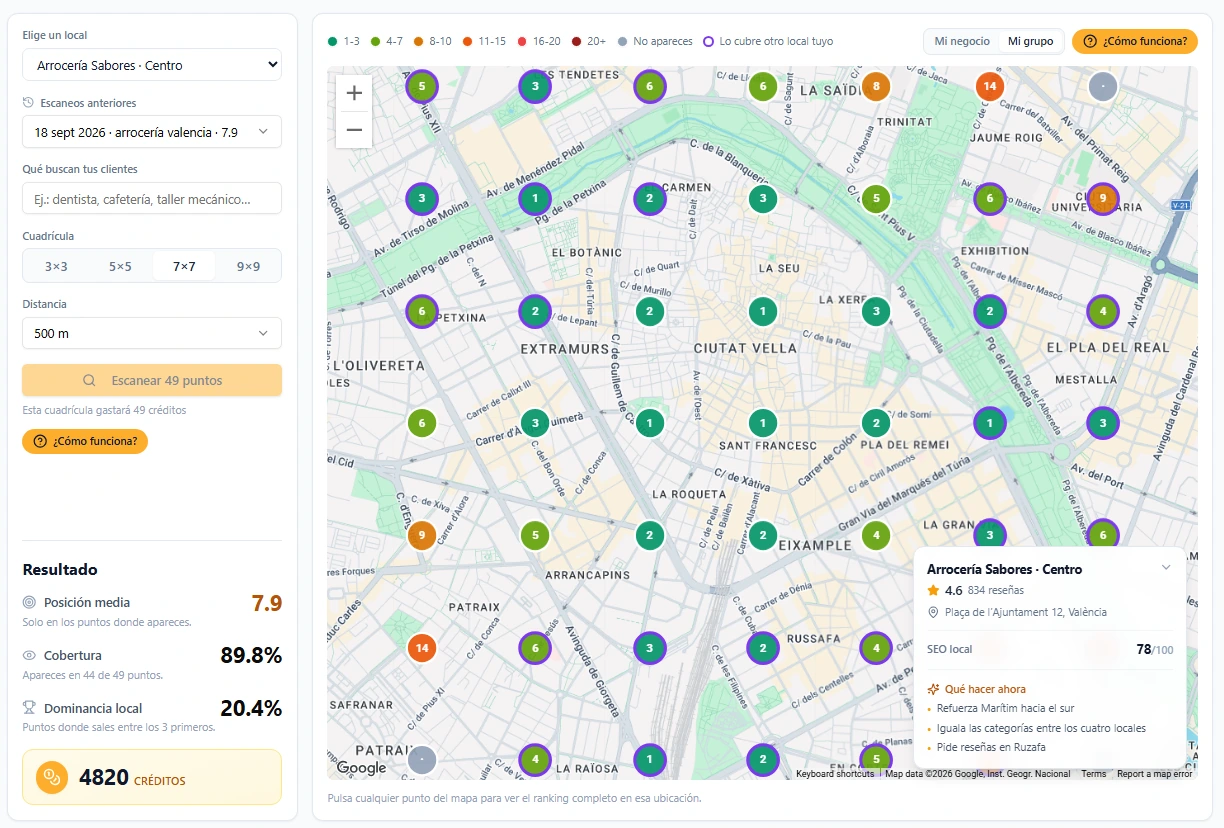
You choose what your customers search for (“sushi restaurant” or “sushi near me”, for example) and the size of the area around your business. In seconds you have a map with your exact position at every point: green if you come up among the first, red if you struggle to appear, grey if you do not appear at all.
- Average position
- 7.9
- Your average ranking, counting only the points where you appear
- Coverage
- 89.8%
- At how many of the scanned points you show up, even if low down
- Local dominance
- 20.4%
- At what percentage of points you are in the top 3
Compare yourself with whoever really competes for your customers
You pick the rival by name: the same business your customers get when they search for what you sell. You choose them from the list of businesses in your area, with their rating and their reviews in view, and you compare their position with yours, point by point. That shows you something an average never would: you may be doing well on your own street while a few hundred metres away they come up before you.
- Position 1-3
- 4-7
- 8-10
- 11-15
- 16-20
- 20+
- Not showing
Each point is an area your customers search from, and the number is the position you come up in from there.
You know exactly what is holding you back, not just that you are doing badly
Your listing gets a score from 0 to 100 that sums up how ready it is to rank well, with levels running from “Just starting” to “Local leader”.
But the number itself is not what changes things. What matters is that behind that score we know exactly what is weighing on it: whether you are short of recent reviews, whether your listing has gone months without posting, whether the categories do not match what people search for, or whether you simply need up-to-date photos.
It is not an opinion or a black box: it comes from your listing’s real data. So when you change something, the score really moves — not because we say so.
And rather than leaving you with a list of twenty things to look at, we tell you which one will move the needle most. That is where you start, not wherever you feel like.
You are 9 points away from “Well positioned”.
- Unanswered reviews
- 4
- Reply rate (30 days)
- 62% · target 80%
- Change this month
- +6 pts
- NAP details20/20
- Categories16/20
- Visual presence12/18
- Reputation8/20
- Keywords and services6/12
- Activity0/10
40-50%
of search clicks go to the map of the top three
The first result does not just take the first click, it takes half of them
When someone searches for a business like yours, they hardly ever get as far as opening a website. They see the map with the top three results (the “local pack”) and decide right there.
That map takes between 40 and 50% of all the clicks on the search. If you come up fourth or lower, you are left with a tiny fraction of that traffic, even if your business is better than the three above you.
It is not a small margin you can ignore. It is the difference between being found and not being seen at all.
Frequently asked questions
No. You connect your Google Business listing in two minutes and have your first scan in the same session.
You choose the size of the grid around your business, from a small area to wide coverage. The more area you cover, the more points you scan: a 5×5 is 25 points and a 7×7 is 49. Each point costs one credit, and the balance you have left is always in view on the scanner screen itself.
You see the full list of businesses in your category in the area, with their average position and their local dominance. You compare against one at a time, but you can switch competitor whenever you like without spending a new scan.
Yes. Each location has its own grid and its own score, and you can see a ranking across all your locations to know which one needs the most attention.
It updates on its own. It is not tied to the SEO map scans, so it does not spend credits or depend on you launching a new one: it is recalculated every time you open the screen, using your listing’s data (reviews, photos, categories, posts). A change you have just made in Google may take a little while to show, as long as it takes us to read your listing again.
Stop guessing how Google
Connect your listing in two minutes, scan your area and know in the same session where you stand and what to do to climb.